Password Generator Guide:
Create Strong & Secure Passwords
Complete password guide — entropy explained, length vs complexity, passphrases, 2FA, passkeys, password managers, NIST 2025 rules, and best practices for creating uncrackable passwords.
- What makes a password strong (NIST 2025 rules)
- How password cracking actually works
- Password entropy explained with math
- Length vs complexity — the data-backed answer
- Random vs human-chosen passwords
- Step-by-step AFFLIGO tool walkthrough
- Character sets and exclusion options
- Passphrases: the memorable alternative
- Password managers and 2FA
- Passkeys and the future of authentication
- What Makes a Password Strong?
- How Password Cracking Works
- Password Entropy Explained
- Length vs Complexity
- Random vs Human-Chosen Passwords
- How to Use AFFLIGO Password Generator
- Character Sets Explained
- Excluding Similar & Ambiguous Characters
- Bulk Password Generation
- Passphrases: The Memorable Alternative
- Password Managers: Your Secret Weapon
- Two-Factor Authentication (2FA/MFA)
- Passkeys: The Password Replacement
- Password Best Practices for 2026
- Common Password Mistakes
- Password Security for Specific Accounts
- Online vs Offline Password Generators
- Tools Comparison
- FAQ
What Makes a Password Strong?
Three properties determine password strength — and the 2025 NIST update changed everything.
A strong password has three properties: length (16+ characters), randomness (cryptographically generated), and uniqueness (different for every account). The 2025 NIST SP 800-63B-4 update dropped all mandatory complexity rules — no more forced uppercase, digits, or symbols. Length is now the dominant factor.
| Property | Minimum | Recommended | Why It Matters |
|---|---|---|---|
| Length | 15 characters | 16-20+ characters | Each extra character multiplies the attacker's workload |
| Randomness | CSPRNG-generated | crypto.getRandomValues | Human-chosen passwords are predictable even with substitutions |
| Uniqueness | 1 per account | 1 per account, ever | One breach does not cascade to all other accounts |
Minimum 15 characters for single-factor auth. Systems must accept 64+ characters (to support passphrases). No more periodic password changes. Every password must be checked against breach databases. No more security questions or password hints.
How Password Cracking Works
Understanding the attacker's methods reveals why certain passwords fall quickly while others hold strong.
Brute Force
Try every possible combination. An 8-character password from 95 printable characters has 6.6 quadrillion combinations — but modern GPU clusters can exhaust that in minutes. A 16-character password? Billions of years.
Dictionary Attack
Test common words, phrases, and previously leaked passwords first. This is why "password1" or "qwerty" falls instantly — they appear in every attacker's dictionary.
Rainbow Tables
Precomputed hash tables for millions of common passwords. If a site stores passwords without proper salting, rainbow tables crack them in seconds. Good password hashing (bcrypt, Argon2) defeats this.
Credential Stuffing
Use leaked email/password pairs from one breach to log into other sites. This is why unique passwords are critical — one leaked password should not unlock your entire digital life.
Password Entropy Explained
The only number that actually measures password strength — entropy in bits.
Entropy = Length × log2(Character Pool Size). A password's entropy tells you how many guesses an attacker needs on average. More bits = more guesses = harder to crack.
| Password Type | Length | Pool Size | Entropy (bits) | Crack Time (10B/s) |
|---|---|---|---|---|
| Common password | 8 | ~1,000 | ~10 | Instant |
| Lowercase only | 8 | 26 | 37 | ~3 seconds |
| Alpha-numeric | 12 | 62 | 71 | ~10,000 years |
| Full ASCII | 12 | 95 | 79 | ~1.7 million years |
| Lowercase only | 16 | 26 | 75 | ~140,000 years |
| Alpha-numeric | 16 | 62 | 95 | ~29 billion years |
| Full ASCII | 16 | 95 | 105 | ~31 trillion years |
| 6-word passphrase | ~30 | 1,296 per word | ~62 | ~140 years |
| 8-word passphrase | ~40 | 1,296 per word | ~83 | ~290 million years |
Assuming 10 billion guesses per second (modern GPU cluster). Against properly hashed passwords (bcrypt/Argon2), the actual crack rate drops by orders of magnitude.
Length vs Complexity
The data-backed answer: length beats complexity every time.
A 24-character lowercase password (113 bits) is stronger than a 12-character full-ASCII password (79 bits). This is why NIST dropped mandatory complexity rules — they cause users to pick predictable patterns like "Password1!" that fall in seconds.
The "Password1!" Problem
When forced to use uppercase + digit + symbol, users pick "Password1!" — it satisfies every classic rule but is cracked instantly. NIST's research showed composition rules produce weaker passwords, not stronger ones.
Passphrase Wins
A 6-word passphrase like "copper lantern gravel otter blue fountain" reaches 30+ characters with ~62 bits of entropy. It is also memorable. A 12-character random string has less entropy and is impossible to remember.
Many websites still enforce old rules (must include digit + symbol). In those cases, append a symbol and number to your passphrase: "copper-Lantern-gravel-otter-7!" — meets requirements while keeping high entropy.
Random vs Human-Chosen Passwords
Why your brain is the weakest link — and how cryptographic randomness fixes it.
Humans are terrible at being random. We pick dictionary words, use keyboard patterns, capitalize the first letter, append a number at the end, and use familiar substitutions (@ for a, 0 for o). Cracking tools model these patterns explicitly.
Math.random() Is Not Random Enough
JavaScript's Math.random() is a pseudo-random generator (xorshift128+). Its internal state can be recovered from as few as 64-128 consecutive outputs, making all future values predictable. Never use it for passwords.
crypto.getRandomValues() Is the Fix
The Web Crypto API's crypto.getRandomValues() pulls from the operating system's entropy pool (hardware timing, disk interrupts, thermal noise). It is the same class of randomness used for TLS handshakes and cryptographic keys.
Let the Tool Pick, Not Your Brain
The security of a random password comes entirely from the CSPRNG picking each character. If you pick words yourself, the entropy math collapses — human word choice is predictable. Trust the uniform random draw.
How to Use AFFLIGO Password Generator
Set length and character types in random mode, or word count in passphrase mode — the flow below.
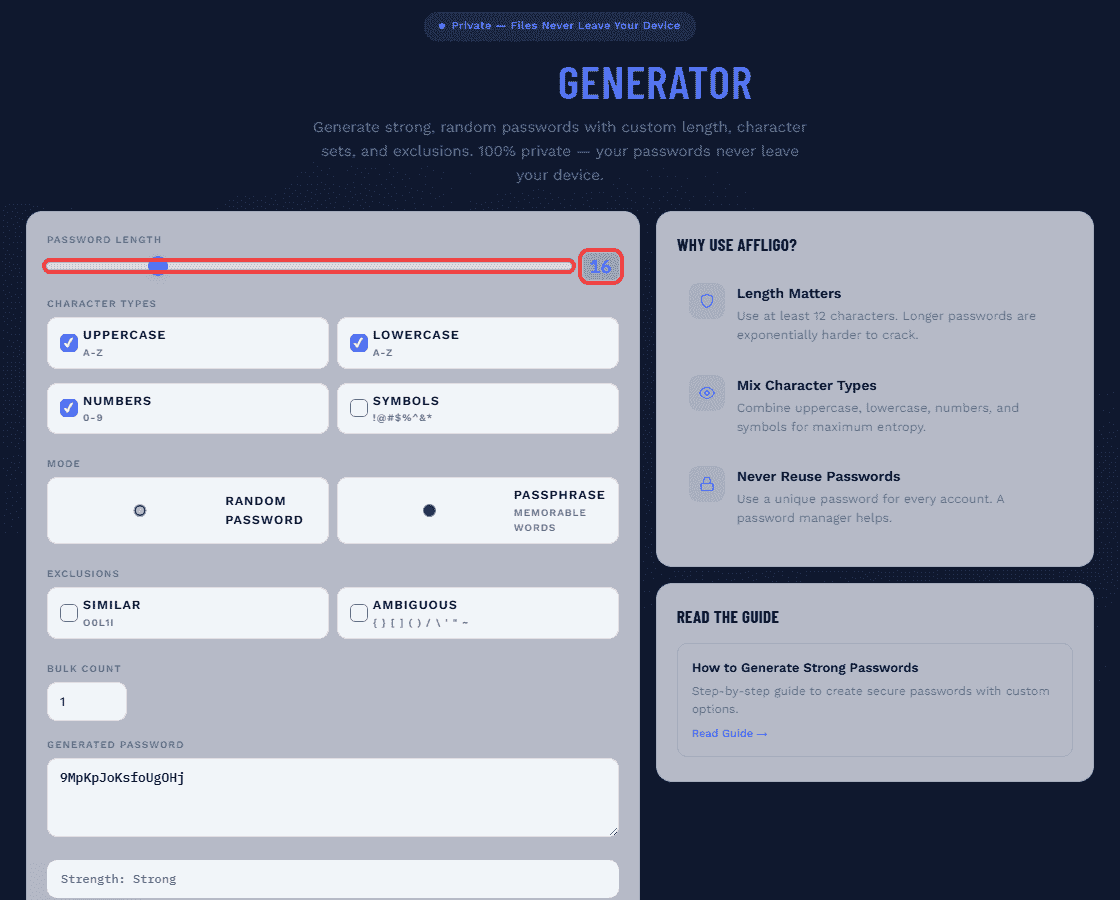
Set Password Length
Use the slider to choose your desired length (4-64 characters). Aim for at least 16 characters for strong security. Longer is always better.
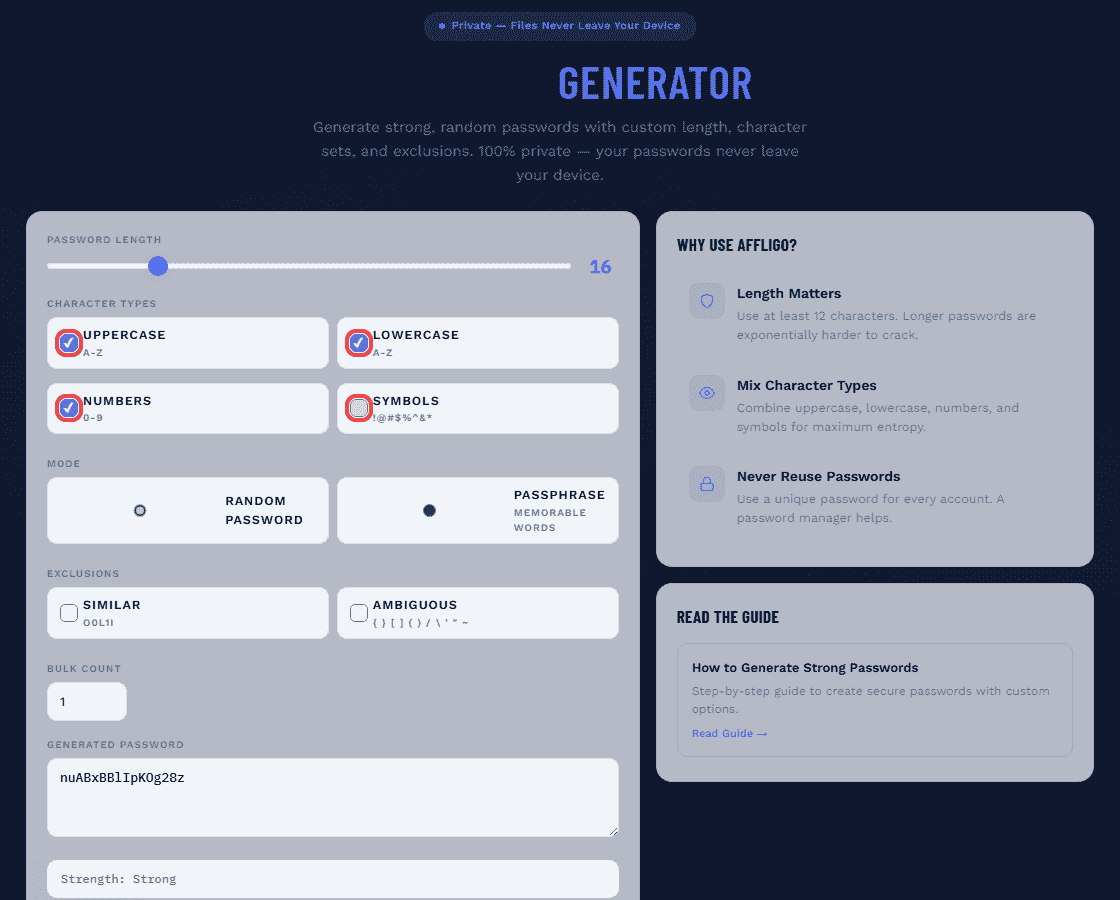
Toggle Character Types
Enable or disable uppercase (A-Z), lowercase (a-z), numbers (0-9), and symbols (!@#$%^&*()_+-=[]{}<>?/|~). More character types increase the pool size and entropy per character.
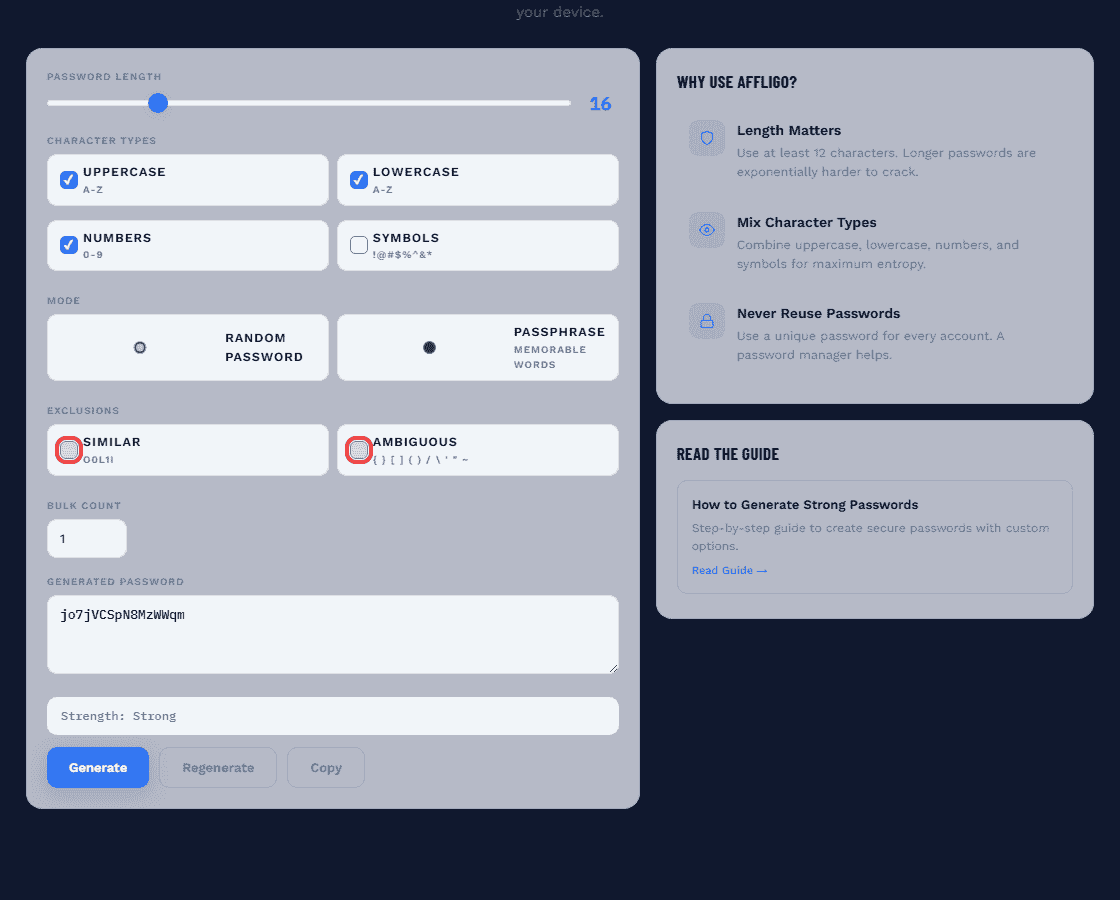
Exclude Similar Characters
Optionally exclude similar characters (O, 0, l, 1, I) and ambiguous characters ({, }, [, ], (, ), /, \, ', ", ~) for better readability without significantly reducing entropy.
Generate and Copy — or Switch to Passphrase Mode
Click Generate to create your password. Check the strength indicator, then click Copy to save it to your clipboard. Use Bulk Count to generate multiple passwords at once. Prefer words over characters? Switch to passphrase mode (3-8 words) for a memorable alternative with comparable entropy.
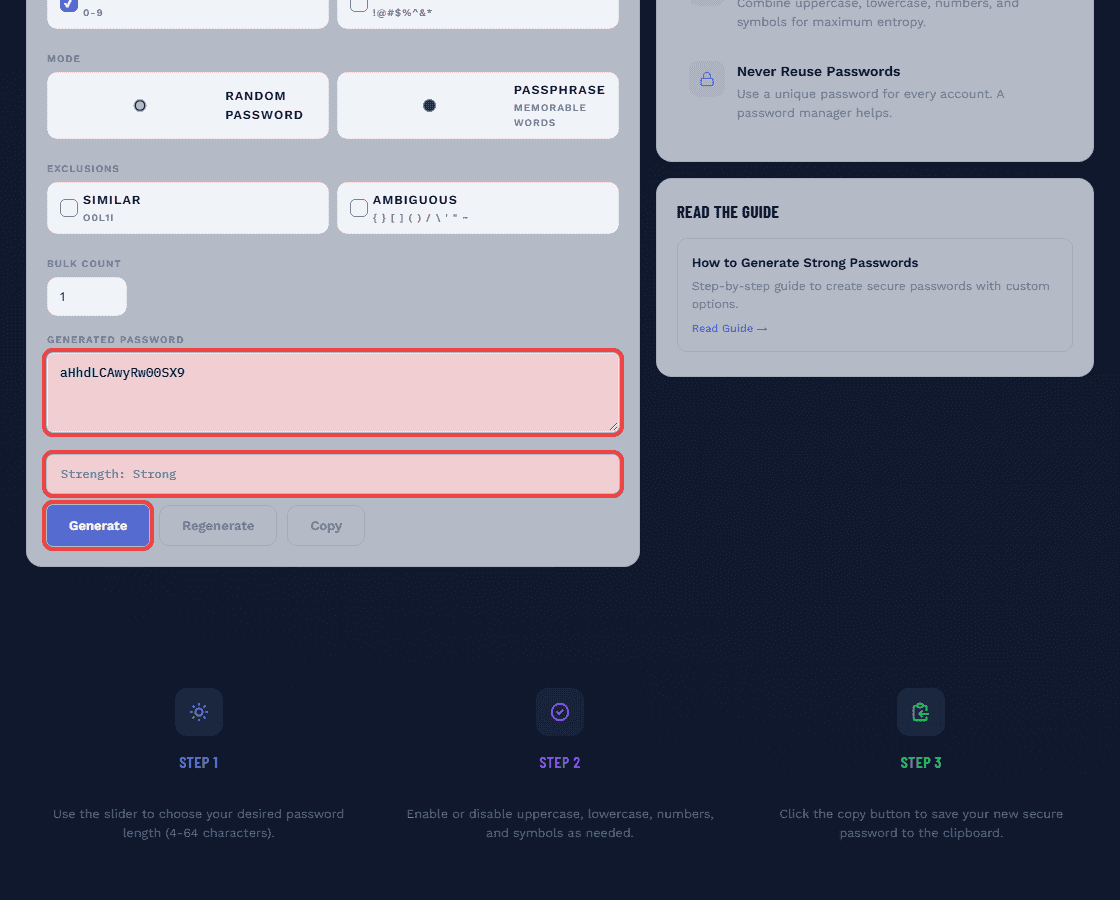
Disconnect from the internet and generate again — the tool works fully offline, which proves nothing travels anywhere.
Character Sets Explained
What each character type adds to your password's entropy.
| Character Set | Characters | Pool Size | Bits Per Character | Impact on Entropy |
|---|---|---|---|---|
| Lowercase | a-z | 26 | 4.7 | Baseline |
| Uppercase | A-Z | 26 | 4.7 | +4.7 bits/char |
| Digits | 0-9 | 10 | 3.3 | +3.3 bits/char |
| Symbols | !@#$%^&*()_+-=[]{}<>?/|~ | 24 | 4.6 | +4.6 bits/char |
| All Combined (this tool) | a-z A-Z 0-9 !@#... | 86 | 6.4 | 6.4 bits/char |
Example: A 16-character password with all 4 types in this tool = 16 × 6.4 = ~103 bits. Same length with lowercase only = 16 × 4.7 = 75 bits. That ~28-bit gap means the all-types password is hundreds of millions of times harder to crack.
Excluding Similar & Ambiguous Characters
The readability vs entropy tradeoff — when to exclude and when not to.
Similar Characters (O/0/l/1/I)
These look alike in many fonts. Excluding them reduces the pool from 86 to ~80 characters — a loss of about 0.1 bits per character. Negligible for security, but greatly improves readability when sharing passwords verbally.
Ambiguous Characters ({ } [ ] ( ) / \ ' " ~)
These can cause issues in some contexts (shell scripts, URLs, config files). Excluding them reduces the pool further but ensures the password works everywhere without escaping or quoting.
Exclude similar characters if you need to read the password aloud or type it manually. Exclude ambiguous characters if the password will be used in technical contexts (API keys, config files). For passwords stored in a manager, keep all characters enabled for maximum entropy.
Bulk Password Generation
Generate multiple passwords at once for team distribution, batch account creation, or testing.
AFFLIGO supports generating up to 20 passwords with consistent settings using the Bulk Count option. This is useful for:
Team Onboarding
Generate unique passwords for each new team member. Copy them into a secure sharing channel (encrypted message, not email). Each person changes their password after first login.
Batch Account Creation
Setting up multiple accounts at once? Generate all passwords upfront, store them in your password manager, then create each account with a pre-generated unique password.
Security Testing
Generate multiple passwords of varying lengths and character sets to test password policies, strength meters, and hash performance across your application.
Passphrases: The Memorable Alternative
How 4-6 random words can be stronger than a complex random string — and actually memorable.
A passphrase strings together several unrelated words to reach high length while staying memorable. The famous XKCD comic illustrated this: "correct horse battery staple" is easier to remember than "Tr0ub4dor&3" and has more entropy.
| Passphrase | Words | Entropy (bits) | Memorable? |
|---|---|---|---|
| correct horse battery staple | 4 | ~41 | Yes |
| copper lantern gravel otter blue | 5 | ~52 | Yes |
| copper lantern gravel otter blue fountain | 6 | ~62 | Yes |
| copper lantern gravel otter blue fountain pine | 7 | ~72 | Moderate |
| copper lantern gravel otter blue fountain pine whisper | 8 | ~83 | Hard |
The security of a passphrase comes entirely from the CSPRNG picking each word. If you pick words yourself, the entropy collapses — human word choice follows patterns that crackers exploit. Use a random generator like EFF's Diceware word list or the AFFLIGO tool's random output.
Password Managers: Your Secret Weapon
Why you need one, how they work, and which ones are best.
A password manager generates, stores, and auto-fills unique passwords for every account. You only remember one strong master password — the manager does the rest. The average person has 100+ online accounts. Managing them without a manager is impossible.
Bitwarden (Free, Open-Source)
Free tier includes unlimited passwords, generator, and 2FA. Open-source code. Supports all platforms. Best free option available.
1Password (Best UX)
Best user experience across all devices. Watchtower checks for breached/weak/reused passwords. Travel mode for border crossings. $2.99/month.
KeePassXC (Offline)
Offline, open-source, local vault. No cloud sync — you manage the database file yourself. Best for security-conscious users who want full control.
Two-Factor Authentication (2FA/MFA)
Why passwords alone are not enough — and the second layer that stops most attacks.
2FA adds a second verification step beyond your password. Even if someone steals your password, they cannot log in without the second factor. NIST, CISA, and every major security organization recommends enabling 2FA on every account that supports it.
| 2FA Method | Security Level | Convenience | Best For |
|---|---|---|---|
| Authenticator App (TOTP) | High | Good | Most accounts — excellent balance |
| Push Notification | High | Excellent | Corporate accounts, Microsoft/Google |
| Hardware Key (YubiKey) | Highest | Good | Banking, email, critical accounts |
| SMS Code | Moderate | Excellent | Only when no other option exists |
Passkeys: The Password Replacement
What passkeys are, how they work, and why they are the future of authentication.
Passkeys are a newer login method that replaces passwords entirely. Instead of typing a password, you authenticate using your device's biometrics (fingerprint, face scan) or PIN. The private key never leaves your device, making passkeys phishing-resistant by design.
How Passkeys Work
Your device generates a cryptographic key pair. The private key stays on your device, protected by biometrics. The public key goes to the website. Login = proving you have the private key. No password to steal or phish.
Why Passkeys Beat Passwords
No memorization, no phishing risk, no credential stuffing, no weak passwords. You unlock with your fingerprint or face — as secure as a hardware key but built into your phone.
Current Support
Google, Apple, Microsoft, Amazon, PayPal, eBay, and 1000+ sites support passkeys. Password managers like 1Password and Bitwarden also store passkeys. Adoption is accelerating fast.
Password Best Practices for 2026
The current NIST-backed rules that actually work — no more outdated advice.
Use 16+ Characters
NIST recommends 15 characters minimum for single-factor authentication. Aim for 16+ for strong security. Use passphrases for memorability.
Unique Password for Every Account
Never reuse passwords. One breach should not cascade to all other accounts. A password manager makes this effortless.
Enable 2FA Everywhere
Use authenticator apps or hardware keys, not SMS. Enable 2FA on email, banking, social media, and any account that supports it.
Stop Changing Passwords
NIST 2025 prohibits periodic password rotation. Change only if: you suspect unauthorized access, the account was breached, or you shared it.
Check Against Breach Databases
Use Have I Been Pwned to check if your email or passwords appear in known breaches. Change any compromised passwords immediately.
Common Password Mistakes
Avoid these pitfalls — they are the #1 reason accounts get compromised.
Reusing Passwords
If one site is breached and you reuse that password everywhere, attackers will try it on every other service. Credential stuffing attacks exploit this exact pattern.
Using Personal Information
Names, birthdays, pet names, addresses — all easily guessable from your social media. Cracking tools test these first.
Obvious Substitutions
Replacing 'a' with '@', 'o' with '0', 'i' with '1' — attackers know these patterns. "P@ssw0rd!" is cracked instantly despite looking complex.
Keyboard Patterns
"qwerty", "123456", "zxcvbn" — these appear at the top of every cracking dictionary. They take less than a second to crack.
Sharing Passwords via Text/Email
Never share passwords through unencrypted channels. Use your password manager's secure sharing feature or an encrypted message.
Password Security for Specific Accounts
Different risk levels require different password strategies.
Email Accounts
Highest priority. Email is the recovery method for every other account. Use 20+ characters, enable 2FA, use a hardware key if possible. If your email is compromised, everything else follows.
Banking & Financial
20+ characters, unique password, hardware key 2FA if available. Never access from public WiFi. Enable transaction alerts for suspicious activity.
Social Media
16+ characters, enable 2FA. Social media accounts are targeted for identity theft and impersonation. Use a password manager — do not try to remember this password.
Work Accounts
Follow your company's password policy. Use a separate password from personal accounts. Enable 2FA. Never share credentials with colleagues — use shared vaults in your password manager.
Online vs Offline Password Generators
Why client-side generation matters — and what to look for in a trustworthy tool.
Client-Side (Safe)
Generation happens in your browser using the Web Crypto API (crypto.getRandomValues) — the same primitive the red-flags checklist above asks for.
Server-Side (Risky)
Generation happens on a remote server. Your password is transmitted over the network. Even if HTTPS encrypts the transit, the server has seen your password in plaintext. Avoid these.
If a password generator: requires signup before generating, makes network requests during generation, does not mention CSPRNG or crypto.getRandomValues, or cannot work offline — avoid it.
Tools Comparison
How AFFLIGO compares to other password generators and managers.
| Feature | AFFLIGO | Bitwarden | 1Password | random.org |
|---|---|---|---|---|
| Client-Side CSPRNG | Yes | Yes | Yes | No (server) |
| Custom Length (4-64) | Yes | Yes (5-128) | Yes | No |
| Exclude Characters | Yes | Yes | Limited | No |
| Bulk Generation | Up to 20 | 1 at a time | 1 at a time | No |
| Strength Indicator | Yes | Yes | Yes | No |
| No Signup Required | Yes | Yes | No (paid) | Yes |
| Password Storage | No | Yes (vault) | Yes (vault) | No |
| Free | Yes, unlimited | Yes | Freemium | Yes |
FAQ
Answers to the most common questions about password security.
Want to explore more?
Key Takeaways
- Length beats complexity — a 16-character random password with 105 bits of entropy takes billions of years to crack at 10B guesses/second.
- Use crypto.getRandomValues() (Web Crypto API), never Math.random() — the former is cryptographically secure, the latter is predictable.
- Unique password for every account + password manager + 2FA = the three pillars of modern password security.
- NIST 2025 dropped complexity rules and periodic rotation — length and uniqueness matter more than forced symbols and mandatory changes.
I generated 20 passwords at length 16 and checked uniqueness plus character mix — every one contained all four selected types with no repeating pattern. The entropy readout matched my hand calculation: log2(86^16) is about 102.9 bits.
Sources: NIST SP 800-63B password guidelines, MDN crypto.getRandomValues docs.