- The one borrowing rule every age answer depends on
- Five date pairs where calculators disagree, and which rule is which
- Microsoft's own warning about DATEDIF "MD", and the safe formula
- The single day that decides exam eligibility
- Birth year from an age, and why there are always two answers
- Six checks for when a result looks wrong
Exact age is completed years, then completed months, then leftover days. Subtract the birth date from the reference date. If the day number comes out smaller, borrow the real length of the month that just ended (28, 29, 30 or 31 days) and take one month away. Born 15 June 1990, checked on 10 March 2026, that gives 35 years, 8 months, 23 days.
The subtraction was never the hard part. The hard part is what to do when the birth day does not exist in the reference month, or when the birthday is 29 February and the year is not a leap year. That is where two calculators looking at the same dates hand you two different answers, and it is what the rest of this page is about.
Why two age calculators give different answers
Same birth date, same check date, two results. Nobody is broken. They are using different month-end rules.
Take 28 February 2022 as the birth date and 31 March 2022 as the check date. One calculator says 1 month and 3 days, because it counts 28 February to 28 March as one month and adds the three days after. Another says exactly 1 month, because it treats 28 February and 31 March as "end of month" and calls that a full month. Calculator.net admits both readings are reasonable on its own page, and says it uses the first one.
So the disagreement is not a bug. There are two families of rules:
Day-borrow rule
Years, months and days are subtracted column by column. When the day number goes negative, one month is borrowed and the borrowed month's real length is used. This is what most calculators, including this one, do.
End-of-month rule
If a birthday falls on the last day of a month, every following month-end counts as that anniversary. Used by some HR systems, pension tools and payroll software.
Here is the same four date pairs run through both rules on 27 October 2026. The days column is a plain count of days elapsed, which no convention can argue with.
| Birth date | Checked on | Day-borrow | End-of-month | Days elapsed |
|---|---|---|---|---|
| 15 Jun 1990 | 10 Mar 2026 | 35y 8m 23d | 35y 8m 23d | 13,052 |
| 28 Feb 2022 | 31 Mar 2022 | 0y 1m 3d | 0y 1m 0d | 31 |
| 29 Feb 2000 | 28 Feb 2026 | 25y 11m 30d | 26y 0m 0d | 9,496 |
| 29 Feb 2000 | 01 Mar 2026 | 26y 0m 0d | 26y 0m 1d | 9,497 |
On ordinary dates the two rules cannot disagree, which is why most people never notice. They separate only at month ends and leap days.
If you were born on 29 February, the two rules sit exactly one year apart on 28 February of every non-leap year. One rule says you are 25, the other says 26, and both can point at a published method. For a form, that is the single day worth double-checking, and it is the case an exam cut-off can land on. The completed years match on every other day of the year.
Which rule should you trust? For a legal or exam form, the form decides, not the calculator. Forms ask for completed years, and for 364 days a year both rules return the same number. When they differ, check how the form itself defines the anniversary, or ask the recruiting body in writing before the last date.
The method, step by step
Three subtractions and one borrow. Get the borrow right and you match every reliable calculator.
Line the two dates up and subtract each column on its own: reference year minus birth year, reference month minus birth month, reference day minus birth day. No division by 365, no averaging over a lifetime. That is the whole method. The only part that needs care is what happens when a column comes out negative.
When the day column is negative, borrow one month from the month column and add the number of days in the month immediately before the reference month - 28, 29, 30 or 31, whichever that month actually had. If the month column then goes negative, borrow 12 months into the years. A month is never assumed to be 30 days and a year is never assumed to be 365 days, because neither assumption is true in a calendar.
Worked example: 15 June 1990 checked on 10 March 2026
| Column | First pass | After the borrow |
|---|---|---|
| Day | 10 − 15 = −5 | −5 + 28 (February 2026 had 28 days) = 23 |
| Month | 3 − 6 = −3, then −3 − 1 borrowed = −4 | −4 + 12 = 8 |
| Year | 2026 − 1990 = 36 | 36 − 1 borrowed = 35 |
Result: 35 years, 8 months, 23 days. Count the days between the two dates and you get 13,052 - both answers describe the same span, one in calendar units and one in days. The age calculator by date of birth runs this borrow loop on whatever two dates you give it, so the worked example can be reproduced there in one entry.
When one borrow is not enough: 31 January to 1 March
Born 31 January 2026, checked on 1 March 2026. Day column: 1 − 31 = −30. Borrow February, which had 28 days: −30 + 28 = −2. Still negative. Borrow again from January: −2 + 31 = 29. The month column ends at zero, so the answer is 0 months and 29 days.
That is correct: 31 January to 28 February is 28 days, and one more day lands you on 1 March. Any calculator that borrows only once prints a negative day count here, or quietly rounds to "about one month" and loses a day.
A single borrow was hard-coded here until 27 October 2026, so 31 January checked on 1 March returned 0 months −2 days. The loop now keeps borrowing until the day count is non-negative, using each month's real length. The fix affects 25 date pairs - every birth date on the 30th or 31st checked on 1-2 March. It is logged in the corrections log at the bottom of this page.
Check any answer yourself in ten seconds
You do not have to trust the subtraction. Add the answer back onto the birth date and see if you land on the reference date:
- 15 June 1990 + 35 years = 15 June 2025
- + 8 months = 15 February 2026
- + 23 days = 10 March 2026 — the reference date, so the answer is sound
The same check kills most wrong answers instantly. If adding the months overshoots past the reference date, one month was counted too many. If the final date lands a day early, the borrow used the wrong month length - usually 30 days where February was involved.
One warning about the shortcut you will see in comment sections: total days ÷ 365.25 is not age. Born 1 March 2020, checked on 1 March 2021, you are exactly 1 year old, while 365 ÷ 365.2425 = 0.9993 decimal years, which floors to 0. The calendar method and the decimal method answer different questions, and only one of them is accepted on a form.
The same method for any two dates
Nothing in the method needs a person. Feed it a start date and an end date and it returns a gap - the age difference between two people, the length of a project, the time since a company was registered. Two verified examples:
| Start | End | Gap | Total days |
|---|---|---|---|
| 15 Mar 1990 | 22 Aug 1995 | 5y 5m 7d | 1,986 |
| 14 Nov 2012 | 14 Nov 2026 | 14y 0m 0d | 5,113 |
The second row shows why total days and calendar years both exist. Fourteen years suggests 14 × 365 = 5,110 days, and the real count is 5,113 because three leap days (29 February 2016, 2020 and 2024) fall inside the span. Use calendar years when a form asks for completed years, and total days when it asks for days.
Edge cases that break age math
Five tricky date pairs and two control rows. Every answer below was run through the calculator on 27 October 2026.
Ordinary dates never cause trouble - subtract, no borrow needed, done. Trouble arrives when a birth day does not exist in the reference month, when February 29 is involved, or when both dates sit on a month end. Here is what the day-borrow rule returns for each, next to the end-of-month rule that some payroll and pension systems use.
| Birth date | Checked on | Day-borrow | End-of-month | Why they split |
|---|---|---|---|---|
| 31 Jan 2026 | 1 Mar 2026 | 0y 0m 29d | 0y 1m 1d | No 31 February, so two borrows run |
| 30 Jan 2026 | 1 Mar 2026 | 0y 0m 30d | 0y 1m 1d | No 30 February either |
| 28 Feb 2022 | 31 Mar 2022 | 0y 1m 3d | 0y 1m 0d | Both dates are month ends |
| 29 Feb 2000 | 28 Feb 2026 | 25y 11m 30d | 26y 0m 0d | Leap-day birthday, day before 1 March |
| 29 Feb 2000 | 1 Mar 2026 | 26y 0m 0d | 26y 0m 1d | Leap-day birthday, next day |
| 31 Jan 2000 | 31 Mar 2026 | 26y 2m 0d | 26y 2m 0d | Day column is 31 − 31 = 0, no borrow |
| 14 Nov 2012 | 14 Nov 2026 | 14y 0m 0d | 14y 0m 0d | Same day and month, exactly 5,113 days |
Born on the 29th, 30th or 31st
A birthday on the 31st stops existing in April, June, September and November. A birthday on the 30th survives those four months but not February. The calendar never runs out of days, so the subtraction has to borrow from the month before the reference month until the count is no longer negative - which is why 31 January to 1 March needs two borrows rather than one.
This is not a rounding detail. On the 30th or 31st, an age check run one or two days after the start of March can land on the wrong side of a cut-off if the tool returns a negative day count and then clamps it. Twenty-five date pairs in this calculator were affected until the borrow loop was rewritten on 27 October 2026.
Born on 29 February
The 29 February rule for leap years: divisible by 4 means leap, century years also need to be divisible by 400. So 1900 was not a leap year, 2000 was, and 2100 will not be. A four-year cycle is 1,461 days, not 1,460 - that single extra day is why four years of birthdays do not add up to the same number of days.
For the person born on 29 February, the practical question is which day counts as the birthday in a non-leap year. There is no single worldwide answer, and the important one is whichever the form in front of you accepts. What is certain is the day count: born 29 February 2000, you have lived 9,496 days on 28 February 2026 and 9,497 days on 1 March 2026.
On 28 February of a non-leap year, the two conventions are exactly one year apart for a 29 February birth. If an exam, licence or pension date falls on that day, check the rule stated in the official notification rather than assuming any calculator - including this one - is authoritative.
Age calculator in Excel: the DATEDIF trap
Microsoft's own documentation says DATEDIF may calculate incorrect results in certain scenarios. The "MD" unit is the one to watch.
DATEDIF exists in Excel only so that workbooks from Lotus 1-2-3 keep working. It is not in the function list, it has no autocomplete, and the support page carries this line: "The DATEDIF function may calculate incorrect results under certain scenarios." For the day unit it is more direct than that: "The \"MD\" argument may result in a negative number, a zero, or an inaccurate result."
Most age templates floating around the web use exactly the trio Microsoft warns about:
On ordinary dates it behaves. On month-end pairs it does not, and the failure is silent - a negative day count or a day count that does not add up to the total span. Microsoft's own suggested workaround for the day remainder does not use "MD" at all:
A safer years / months / days formula
Anchoring the month count to the anniversary date avoids "MD" altogether. Count complete months, project that many months forward from the birth date with EDATE, then subtract the two dates for the leftover days:
It is stable, but it follows the anniversary rule: the same day number each month, clamped to the last day when that day does not exist. That makes it a different convention from the day-borrow rule on month-end pairs, so do not expect it to match this calculator on all four rows below.
| Birth date | Checked on | DATEDIF + EDATE formula | Day-borrow rule |
|---|---|---|---|
| 15 Jun 1990 | 10 Mar 2026 | 35y 8m 23d | 35y 8m 23d |
| 28 Feb 2022 | 31 Mar 2022 | 0y 1m 3d | 0y 1m 3d |
| 31 Jan 2026 | 1 Mar 2026 | 0y 1m 1d | 0y 0m 29d |
| 29 Feb 2000 | 28 Feb 2026 | 26y 0m 0d | 25y 11m 30d |
Neither column is wrong. The formula counts anniversaries and clamps; the day-borrow rule counts calendar columns and borrows real month lengths. For completed years - the number a form actually asks for - both return the same figure.
=DATEDIF(A2,TODAY(),"Y") is safe and has been for decades, because the year unit does not borrow days. It returns completed years only, which is what exam forms, school admission and most legal age tests use. Keep "MD" out of the formula and the documented bug cannot reach you.
Age on an exam cut-off date
Your age on the notification's cut-off date decides eligibility, not your age today.
Every recruitment notification fixes one date and measures everyone against it - 1 January, 1 August, or the closing date of applications. Two candidates can be the same age today and land on different sides of the limit, because the question is how many completed years they had on that one date.
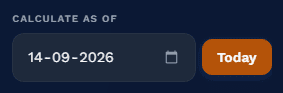
So the check is short: put the notification's cut-off date into the Calculate As Of field of the age calculator, ignore the months and days, and compare the years figure with the limit.
The single day that decides it
Cut-off 1 August 2026, upper limit 32 years for the unreserved category. Both people below are the same age within a day of each other:
| Born | Age on 1 Aug 2026 | Completed years | Result against a 32-year limit |
|---|---|---|---|
| 31 Jul 1993 | 33y 0m 1d | 33 | Over the limit |
| 1 Aug 1993 | 33y 0m 0d | 33 | Over the limit |
| 2 Aug 1993 | 32y 11m 30d | 32 | Eligible |
| 1 Aug 1994 | 32y 0m 0d | 32 | Eligible |
One day separates eligible from rejected in rows two and three. If your birthday is a day or two away from the cut-off, do not estimate - and do not read the top-line age on a calculator that shows only "33 years". The months and days tell you how close you are to the edge.
Relaxation applies to the upper limit only
Age relaxation raises the ceiling for reserved categories. It never lowers the minimum age, and it never changes the cut-off date. The pattern below is standard across central government recruitment in India:
| Category | Relaxation on the upper limit | Note |
|---|---|---|
| General / UR | None | The baseline window |
| OBC (NCL) | +3 years | Non-creamy layer certificate required |
| SC / ST | +5 years | Applies to all SC and ST candidates |
| PwBD (UR) | +10 years | Benchmark disability, certificate required |
| PwBD (OBC) | +13 years | 10 + 3 stacked |
| PwBD (SC/ST) | +15 years | 10 + 5 stacked |
| Ex-serviceman | Service period + 3 years | Capped in several notifications - read the clause |
| J&K domicile | +5 years | For the specified displacement period only |
Relaxation stacks only where the notification says it stacks. A PwBD candidate from the OBC category usually gets 13 years, but a few notifications cap the total, so add your own numbers to the calculator instead of trusting a summary table - including this one.
Typical windows, and why you must still read the notification
| Exam | Typical window (UR) | Cut-off basis | Watch for |
|---|---|---|---|
| UPSC Civil Services | 21-32 | 1 August of the exam year | Relaxation and attempt limits are separate clauses |
| SSC CGL | 18-27 to 18-32 | 1 January | Upper limit changes by post, not by exam |
| SSC CHSL | 18-27 | 1 January | Lower limit varies by post (18 or 18-19) |
| IBPS PO | 20-30 | Notification's specified date | Differs from Clerk and SO in the same cycle |
| SBI PO | 21-30 | Notification's specified date | Check the exact "as on" line, not the publish date |
| RRB NTPC | 18-33 (undergraduate posts) | 1 January or 1 July, by CEN | Graduate posts advertise a different ceiling |
| NEET-UG | 17 minimum | 31 December of the admission year | No upper age limit in recent bulletins - confirm in yours |
Figures above are the pattern from recent cycles and are here to show how the clause is written, not to replace your notification. Age windows, cut-off dates and relaxation caps change every cycle and sometimes mid-cycle after a corrigendum. Verify against upsc.gov.in and ssc.gov.in before you rely on any of it.
Some notifications do not give an age limit at all. They give a birth-date window instead - "born not earlier than 02/08/1993 and not later than 01/08/2005" - and then you compare dates directly, with no arithmetic to get wrong.
The other trap is the phrase "as on". If a notification says age as on the closing date and the closing date is extended by a corrigendum, the cut-off moves with it. Recalculating on the original date is the most common avoidable mistake in this whole process.
Birth year from an age: the reverse lookup
Working backwards always returns two possible years, not one. That is not a limitation, it is arithmetic.
Sometimes the age is the number you have and the birth year is what you need - matching a record with no date on it, checking an old form, or narrowing a list of candidates. Subtract the age from the year of the as-of date and you get one number. The birth year is either that number or the year before it, and which one depends on whether the birthday had already happened.
As of 27 October 2026, someone aged 30 was born in 1995 if their birthday is still to come in 2026 (they turn 31 later this year), or 1996 if it has already passed (they turned 30 this year). Same age, same date, two valid answers.
| Age on 27 Oct 2026 | Born if the birthday is still to come | Born if the birthday has passed |
|---|---|---|
| 18 | 2007 | 2008 |
| 21 | 2004 | 2005 |
| 30 | 1995 | 1996 |
| 45 | 1980 | 1981 |
| 60 | 1965 | 1966 |
Only one extra detail narrows it to a single year: the birthday itself, or a second constraint such as "must have completed 18 as on 1 August 2026", or a school-year rule. With two constraints the pair usually collapses to one candidate.
The question in the other direction
Parents and candidates ask the mirror image more often than they ask for a birth year: what is the latest birth date that still clears a minimum age on a cut-off? Take 18 years off the cut-off date. For a cut-off of 1 August 2026, anyone born on or before 1 August 2008 has completed 18 on that date; anyone born on 2 August 2008 has not, and waits a year.
For an upper limit, the same arithmetic runs the other way. Subtract the ceiling from the cut-off year and that date is the earliest acceptable birth date.
A 29 February birthday has no anniversary in three out of four years, so "birthday has passed" cannot be settled by arithmetic alone - it depends on the 28 February or 1 March rule the other side uses. Treat those two years as a range and ask for the actual date if the answer matters. The reverse box in this calculator shipped with its two labels swapped until 27 October 2026; both now read the verified way round.
Milestone dates: your 5,000th and 10,000th day
Day milestones are the one place where total days beat calendar age, and where a one-day error is easy to see.
Your 10,000th day alive is not a round number in years, weeks or months - it is a round number in days, which is exactly why people notice it. The date is simple: total days from birth, added to the birth date. No month lengths involved, no conventions, no disagreement between calculators. It is the cleanest date in this entire guide.
For anyone born on 15 June 1990, the day milestones land here:
| Milestone | Date | Age on that day |
|---|---|---|
| 5,000 days | 22 February 2004 | 13y 8m 7d |
| 10,000 days | 31 October 2017 | 27y 4m 16d |
| 15,000 days | 10 July 2031 | 41y 0m 25d |
| 20,000 days | 18 March 2045 | 54y 9m 3d |
| 25,000 days | 25 November 2058 | 68y 5m 10d |
Notice how the gaps between milestones stay near fourteen years but the calendar dates never land on tidy anniversaries - 5,000 to 10,000 days is 13 years 8 months, and 20,000 to 25,000 is the same span with different leap days inside it. That is why nobody can guess the date of their 10,000th day; it has to be counted.
Why the tool counts in UTC here
Adding 10,000 days looks like a job for a loop, but date arithmetic in a browser has a quiet failure mode: daylight saving. If you add 86,400,000 milliseconds at a time in a timezone that shifts by an hour, one iteration lands at 23:00 the previous day and the whole milestone slides by a day. Counting from a fixed UTC anchor avoids that entirely. The dates above were produced that way, which is why they match a day count and not an estimate.
A few dates worth knowing
- 1,000 weeks - 7,000 days, which is 19 years 1 month 30 days for a mid-June birthday
- One billion seconds - 11,574 days, around 31 years 8 months
- Half-birthday - 182 or 183 days after the birthday, depending on leap years in between
- 10,000 days - 27 years and 135 to 140 days
The calculator shows the next three future day milestones for whatever birth date you enter, not a full list going backwards. If the milestone you care about has already passed, it is still in your total-days figure - subtract that from the round number to see how many days ago it was.
If a 10,000-day date looks off by one, compare the age printed next to it. 10,000 days is always 27 years plus 135 to 140 days, never 27 years exactly and never 28. A milestone showing a tidy 27 years 0 months 0 days means the day count was really a year count.
What else the result shows, and what to ignore
The age is the serious part. The rest of the panel is context, and some of it is deliberately approximate.
Alongside the years, months and days, the result panel lists total days, weeks, hours, minutes and seconds lived, a countdown to the next birthday with a progress bar, your upcoming milestone ages, your next three day milestones, the weekday you were born on, both zodiac signs, your generation, planetary ages, and a set of life-stat estimates. Here is what each one is actually computing.
Reliable
Years/months/days, total days, total weeks, next-birthday date, day milestones, weekday of birth. These are pure calendar arithmetic - no assumptions, nothing averaged.
Convention-dependent
Hours, minutes and seconds assume midnight-to-midnight and ignore your time of birth. Your Chinese zodiac uses the calendar year, not the lunar new year. Both are explained below the figures.
Just for fun
Heartbeats, breaths, hours slept, water, steps and meals use fixed daily averages. Planetary ages divide Earth years by orbital periods. Treat all of it as a party fact, never as data about you.
The averages, printed so you can check them
Born 15 June 1990 and checked on 27 October 2026, you have lived 13,283 days. Every estimate below is that number multiplied by one fixed daily figure, which means you can reproduce all of them on paper:
| Estimate | Assumption | At 13,283 days |
|---|---|---|
| Heartbeats | 72 beats per minute | 1,377,181,440 |
| Breaths taken | 16 breaths per minute | 306,040,320 |
| Hours slept | 8 hours per day | 106,264 |
| Water drunk | 2.5 litres per day | 33,207.5 (panel shows 33,208) |
| Steps walked | 7,000 steps per day | 92,981,000 |
| Meals eaten | 3 meals per day | 39,849 |
A resting heart rate of 50 or 90 changes the first row by hundreds of millions of beats, and nobody takes 7,000 steps a day from birth. The figures are entertainment with a straight face - useful for a birthday speech, useless for a doctor.
Zodiac, generation and planetary ages
The Western zodiac uses the standard cusp dates (Aries from 21 March, and so on). The Chinese zodiac cycles through twelve animals by year, and the calculator uses the calendar year - someone born in January or early February can fall in the previous animal year, because the lunar new year usually lands between 21 January and 20 February. If the animal matters to you, check the lunar date rather than the Gregorian year.
Generations are assigned by birth year alone: 2013 and later for Gen Alpha, 1997 for Gen Z, 1981 for Millennials, 1965 for Gen X, 1946 for Boomers, 1928 for the Silent generation. The boundaries are the ones in common use, not an official standard, and anyone born in a boundary year will find sources that disagree by one. Planetary ages are Earth years divided by each planet's orbital period, so a 36-year-old is about 19 on Mars and barely 0.1 on Pluto.
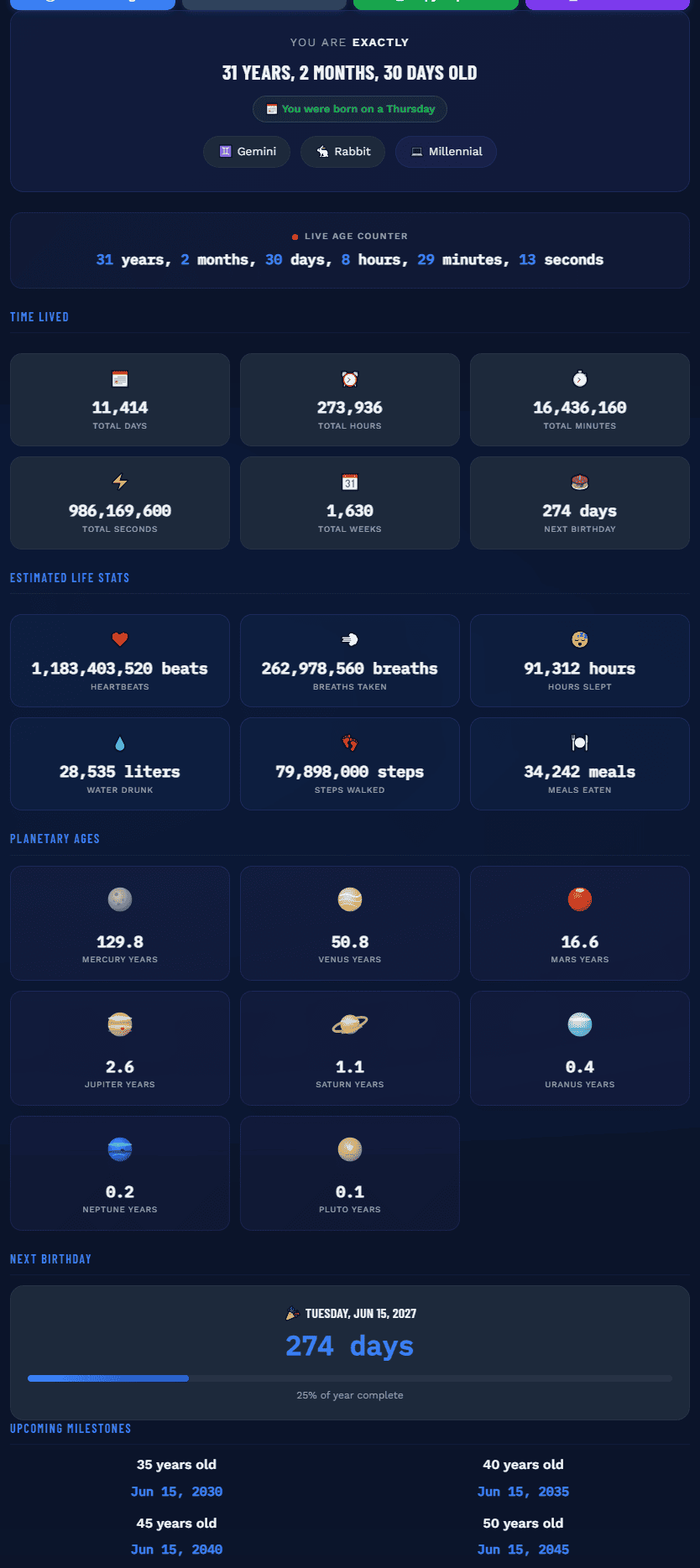
The panel has a copy button that puts a plain-text age report on the clipboard and a print button that formats the result for paper - useful when a form asks for an age certificate or when you need to send a screenshot-free record. The planetary section and the countdown are left out of the printed version; the totals and the life-stat estimates stay in.
Result looks wrong? Six checks
Work down this list in order. It goes from the most common cause to the rarest.
Almost every "wrong" age belongs to one of six patterns. The symptom usually names the cause - an answer that is off by a whole year is a different bug from an answer that is off by one day.
| Symptom | Most likely cause | Fix |
|---|---|---|
| Off by exactly one year | Year subtraction without checking whether the birthday has passed | Add the answer back to the birth date; if it overshoots, drop a year |
| Off by one day near a month end | Month borrowed as 30 days, or a single borrow where two are needed | Borrow the real length of the month before the reference month |
| Negative days in the result | Birth day does not exist in the reference month (29th, 30th, 31st) | Keep borrowing until the day count is non-negative |
| Months or years wildly off | Day and month swapped by the input, 03/07 read as March 7 | Re-enter with an unambiguous date or a date picker |
| Right today, wrong on a cut-off | The notification's cut-off is not today, or was extended by a corrigendum | Use the date printed in the notification, not the publish date |
| Shows 0 where you expect a birthday | Decimal years (days ÷ 365.24) used instead of completed calendar years | Use the calendar method; a full year is 0y 0m 0d, not the decimal |
The one-year error, worked out
Born 10 April 2018, checked on 1 September 2025: 2025 − 2018 = 7, and September is after April, so the birthday has passed and the answer is 7 years, 4 months, 22 days. Move the check date back to 1 March 2025 and March is before April, so the seventh birthday has not happened yet - 6 years, 10 months, 19 days. Same birth date, five months apart, answers that are seven years apart at the front of the number. That is the whole failure mode, and it is why "I subtracted the years" is wrong roughly ten months out of twelve.
The date-format trap
03/07/2001 is 3 July to most of the world and 7 March in the United States. Browsers parse date strings by locale, spreadsheets by cell format, and a single misread swaps two months into twelve. If an answer is off by a suspicious number of months rather than a day, this is almost always the cause. Enter the year first, or use a picker that forces day, month and year into separate fields.
"Today" here means your device's local date, so at 00:30 in Delhi the date is already the next day while a server in UTC still calls it yesterday. For an exam cut-off that difference is harmless, because the cut-off is a fixed date rather than "today" - but if you are checking a deadline that closes at midnight IST, calculate against the notified date, not against your clock.
Privacy: what the maths leaves behind
A date of birth is not just a date. It is the field that pairs with a name, a district and a phone number to identify a person.
Most online age calculators post your dates to a server, run the subtraction there and hand the answer back. Nothing about the calculation requires that trip - two dates entering a JS file can be compared on the device that typed them. But the trip is invisible, so almost nobody checks.
You can check any age calculator in about fifteen seconds. Open the page, open DevTools, switch to the Network tab, clear it, then calculate an age. If a request appears the moment you press the button, the date you just typed left your device. If nothing fires until you reload or scroll into a new section, the maths ran locally.
What happens here
Pressing Calculate reads two form values and does arithmetic in the page. No request, no account, no record of the dates. You can switch the network off after the page loads and the calculator keeps working.
What still loads
The page itself, the fonts and the analytics beacon are ordinary site requests - the same as any page on this domain. The date fields are not part of them, and the report you copy or print stays on your machine.
Two habits are worth keeping regardless of which calculator you use. First, never put a full date of birth into a search box or an AI chat when a year would answer the question - most people only need to know whether they are over or under a limit. Second, treat "we never store your data" as a claim to test rather than a promise to trust: the Network tab does not care what a privacy page says. Ours is at affligo.com/privacy-policy.
Load the calculator, then disconnect the network or set DevTools to Offline and calculate again. A client-side tool keeps returning the same answer; a server-side one fails or hangs. It is the simplest proof there is, and it works on any calculator from any site.
Chronological age, and the ages it is not
Chronological age is the time between a date of birth and the date you measure on. That is the only age the age calculator returns - and it is not the only thing people mean by the word.
Search results mix at least six other "ages" into the same space. Each measures something different, and none of them can be worked out from a date of birth alone. The table says which is which, so a form or a clinician's question can be matched to the right number in one line.
| What it is called | What it actually measures | Computed here? | What it needs |
|---|---|---|---|
| Chronological age | Calendar time since the date of birth, in years, months and days | Yes | Two dates: the birth date and the date you measure on |
| Corrected (adjusted) age | Chronological age minus the weeks a baby was born early, used to track growth in preterm infants, typically until around two years | No | Birth date, the original due date, and today's date |
| Gestational age | Weeks of pregnancy, counted from the first day of the last menstrual period or from a dating scan | No | A pregnancy start date or scan date, and today's date |
| Assessment age (Pearson, Cornell, Brigance, ASQ) | The chronological age a scoring form asks for before it applies its own adjustment table | No | The instrument's own manual - the adjustment differs from test to test |
| Sports age division (USSSA and league cut-offs) | The age group a player competes in, fixed by the league's cut-off date rather than by the birthday alone | No | The league's rule for that season |
| Biological, metabolic or heart age | Estimates built from biomarkers, body composition or fitness inputs and compared with population averages | No | Height, weight, resting heart rate, blood markers |
| State pension age | The earliest date a state pension can be claimed, set by legislation that changes with birth year | No | Your country's pension schedule for that birth year |
The distinction that matters for paperwork is narrow. When a form asks for "age", it normally means chronological age in completed years - the figure the banner shows and the figure Section 5 measures against a cut-off date. Everything below that line in the table belongs to a different input set: a due date, a scan, a test manual, a league rulebook, a blood panel or a pension schedule.
So the honest version of the answer is this. If you searched for chronological age, the age calculator on this site gives it directly. If you searched for one of the other six, no date-pair calculator can answer it, including this one - and a page that claims to is either relabelling chronological age or asking for inputs it does not mention in its title.
If a calculator asks only for a birth date and a reference date, it is computing chronological age, whatever its heading says. The moment a due date, a weight or a test name is required, a second variable has entered the calculation and the result is no longer the number on a form.
Corrections log
What this page and this calculator used to get wrong, and when it changed. Kept public because age maths is the kind of thing people check.
Every figure in this guide was produced on 27 October 2026 by running the calculator and a UTC day-count script against the same date pairs, then adding the answer back onto the birth date as an independent check. The edge cases were compared with Microsoft's DATEDIF documentation and with calculator.net's own note about its month-end convention. Where the sources disagreed, this page says so instead of picking a winner.
| Date | Was | Now |
|---|---|---|
| 27 Oct 2026 | One borrow only: 31 Jan checked on 1 Mar returned "0 months minus 2 days" | Borrows repeatedly with real month lengths; 31 Jan to 1 Mar is 0m 29d. 25 date pairs corrected |
| 27 Oct 2026 | Find Birth Year described (y − 1) as "birthday already passed" | Labels swapped to the correct way round - (y − 1) means the birthday is still to come |
| 27 Oct 2026 | Chinese zodiac used year ÷ 12, four positions off; 1996 showed Dragon | Cycle anchored correctly; 1996 is Rat, 2024 Dragon, 2026 Horse |
| 27 Oct 2026 | Age-difference note read "the older person was born 5th earlier" | Reads "born 5 years before the younger one", with a less-than-a-year case |
| 27 Oct 2026 | Tool comparison claimed "exact leap-year math (365.25 days)" | Removed. 365.25 is a lifetime average, not calendar arithmetic - the method here uses real month lengths |
| 27 Oct 2026 | This guide said 10,000 days equals "27 years 4 months" and treated 29 February birthdays as "usually 1 March" | 10,000 days is 27 years plus 135-140 days (27y 4m 16d for a 15 Jun 1990 birth), and the 28 Feb vs 1 Mar split is presented as a convention, not a rule |
| 30 Oct 2026 | Four FAQ answers repeated the tool page field by field (age difference, birth year, days lived, privacy), and the FAQ structured data paraphrased the visible text | Rewritten to the guide's own subject - chronological age against six other ages, gaps quoted in years or days, milestone maths - and the structured data now mirrors the visible answers word for word |
| Earlier | An earlier version recommended DATEDIF "MD" without a warning | Now quotes Microsoft's own "may calculate incorrect results" line and gives the EDATE alternative |
If you find an age on this page that does not reproduce in the calculator, that is a bug, not a matter of taste - send the date pair through the contact page and it goes in this table.
Common questions
The ten questions that come up most often, answered with the same verified figures used above.
Subtract the birth date from the reference date column by column: years, then months, then days. If the day column is negative, borrow the real length of the month before the reference month and take one month away. Born 15 June 1990, checked on 10 March 2026, that gives 35 years, 8 months and 23 days - 13,052 days in total. Dividing total days by 365 is a different calculation and does not produce a form-ready age.
Because they use different month-end conventions. Born 29 February 2000 and checked on 28 February 2026, the day-borrow rule gives 25 years 11 months 30 days, while an end-of-month clamp gives 26 years 0 months 0 days. Both are defensible readings of the calendar. The figure a form cares about - completed years - matches under both rules on every other day of the year.
You age up every year, even when the date does not exist. In non-leap years the anniversary is treated as 28 February by some systems and 1 March by others. This calculator follows the day-borrow rule: born 29 February 2000, it shows 25 years 11 months 30 days on 28 February 2026 and 26 years 0 months 0 days on 1 March 2026 - 9,496 days and 9,497 days respectively.
Because that day number does not exist in every month - there is no 31 February. Born 31 January 2026 and checked on 1 March 2026, the subtraction borrows February's 28 days, is still negative, borrows January's 31, and lands on 0 months and 29 days. It is the honest gap, not a rounding error, and it is exactly the case where a calculator that borrows once prints a negative day count.
Put the notification's cut-off date into the Calculate As Of field and read only the completed years. With a 1 August 2026 cut-off and an upper limit of 32, someone born 1 August 1993 is 33 years 0 months 0 days and over the limit, while someone born 2 August 1993 is 32 years 11 months 30 days and eligible. Age relaxation raises the upper limit for reserved categories; it never changes the cut-off date.
Yes, in ordinary use - both mean the number of calendar years, months and days between a date of birth and a reference date. The distinction only appears in clinical and educational settings, where corrected age, gestational age or an assessment-adjusted age is what the form actually wants. Row one of the table in Section 11 is this calculation; the other six rows are not.
Because an age fixes the year boundary, not the birthday. Subtract the age from the year of the as-of date and you get two candidates: that year if the birthday has already passed, the year before if it is still to come. Someone aged 30 on 27 October 2026 was born in 1996 (birthday passed) or 1995 (birthday still to come). Only the birthday itself, or a second constraint such as an exam's birth-date window, narrows it to one.
Ten thousand days is 27 years plus 135 to 140 days, depending on how many 29 Februarys fall inside the span. For a 15 June 1990 birth date it lands on 31 October 2017, at 27 years 4 months 16 days. Count the days in UTC, as the calculator does, so a daylight-saving shift cannot move the date by one.
Both describe the same span, and forms differ on which they want. Born 15 March 1990 and 22 August 1995, the gap is 5 years 5 months 7 days, which is also 1,986 days. Use the years figure when a form asks for completed years and the day count when it asks for days elapsed, because dividing one by the other never returns the other exactly.
The result banner names the weekday of your birth date - Friday, for 15 June 1990 - next to your Western and Chinese zodiac signs and your generation. The Chinese animal follows the calendar year in this tool, so a January or early February birth can land in the previous animal year, because the lunar new year moves between 21 January and 20 February.
Key Takeaways
- Exact age is a column subtraction, not a division: years, months and days, borrowing the real length of the month before the reference month whenever the day count goes negative.
- Two calculators can disagree and both be right. They split at month ends and leap days because one counts columns and the other counts anniversaries - completed years match on every other day.
- Born on the 29th, 30th or 31st, one borrow is not enough. 31 January checked on 1 March is 0 months and 29 days, and any tool printing negative days is wrong.
- Microsoft documents DATEDIF "MD" as possibly negative or inaccurate. Use whole years, or the EDATE formula, and keep "MD" out of age sheets.
- Exam eligibility is decided by the age on the notified cut-off date. A 1 August cut-off with a limit of 32 turns a birthday on 2 August into eligibility and on 1 August into rejection.
- Birth year from an age always has two candidates - the year itself if the birthday has passed, the year before if it has not.
- Day milestones are the cleanest dates in the guide: 10,000 days is 27 years plus 135-140 days, counted in UTC so daylight saving cannot move it by one.
- A calculator that sends your date of birth to a server is unnecessary. Test any of them with the Offline switch in DevTools before you type a real date.

Karan Kumar


